Free · Without an account · In CHF
Your household budget template for Switzerland
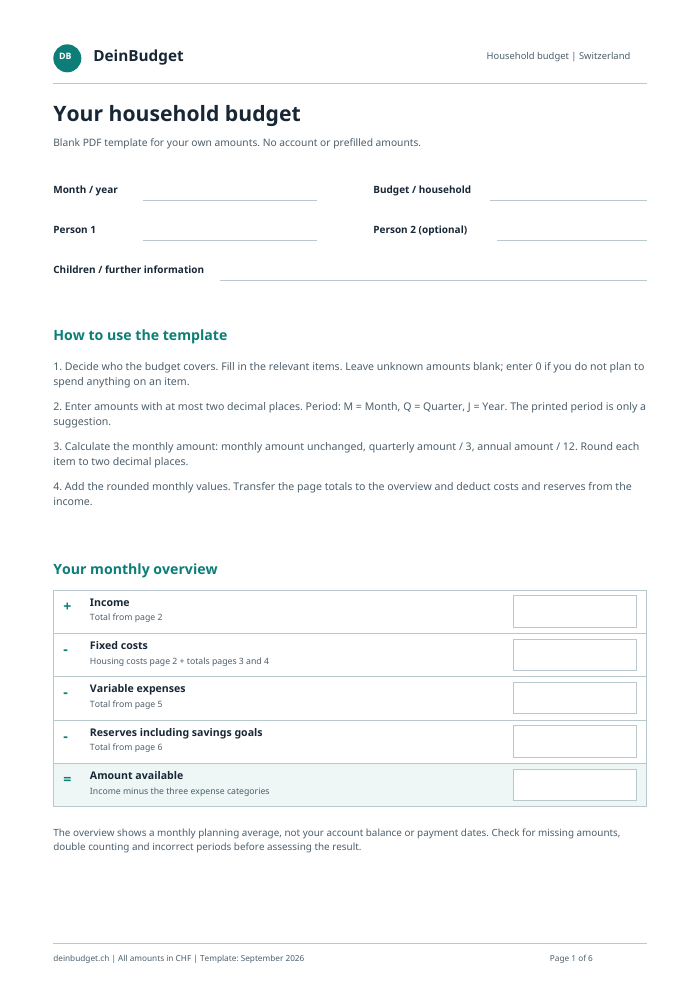
Plan how much money you receive, spend and put aside. Excel does the calculations for you. You can print the PDF template and fill it in by hand.
PDF · Excel · English · 05.09.2026
How to use the Excel template
Get your monthly overview in four steps
- Open the file. Download the Excel template, open it in Excel and select the “Budget” tab at the bottom of the window.
- Enter your amounts. Enter your income and expenses in the light blue fields under “Amount (CHF)”. Use at most two decimal places. Leave rows that do not apply to your household blank.
- Select time period. Under “Period”, choose Month, Quarter or Year to match the amount you entered. Excel calculates “Month (CHF)” automatically.
- View and save result. Switch to the “Overview” sheet. Excel automatically shows how much is left after your expenses and reserves. Check if there are any missing amounts and save your file.
What do I enter if I don't have an amount? If you do not know an amount yet, leave the field blank and add it later. If you have decided to budget 0 CHF for that item, enter 0. Excel only uses the amounts you enter, so remember to add any missing expenses.
Are you using the PDF template? Print it out and enter your amounts by hand. You calculate monthly values and totals yourself; the instructions are on the first page.
You can find more help with planning in our guide: Create a household budget step by step.
What belongs in your budget?
Income and expenses to consider
Go through the sections and check which items apply to your household. Alongside rent and groceries, remember annual bills and money for future expenses. Expand a section to see its items. The Excel and PDF templates contain the same items.
Income 7 items
- Net income – Person 1
- Net income – Person 2
- Family allowances
- 13th-month salary – Person 1
- 13th-month salary – Person 2
- Maintenance payments received
- Other income
Fixed costs · Housing costs 10 items
- Rent including ancillary costs
- Mortgage interest
- Housing contribution or other housing costs
- Separate heating and ancillary costs
- Heating costs
- Chimney and heating maintenance
- Water, wastewater and refuse
- Building insurance
- Contributions to the renovation fund
- Electricity
Fixed costs · Energy & communication 5 items
- Internet and TV plan
- Mobile plans – household
- Streaming and digital subscriptions
- Serafe
- Separate cable connection
Fixed costs · Taxes 4 items
- Cantonal, municipal and church taxes
- Direct federal tax
- Fire brigade exemption tax
- Military service exemption tax
Fixed costs · Public transport 1 items
- Public transport passes – household
Fixed costs · Car & motorcycle 4 items
- Motor vehicle tax
- Vehicle insurance
- Garage or long-term parking space
- Lease payment
Fixed costs · Insurance & pension provision 5 items
- Compulsory health insurance (KVG) – household
- Supplementary health insurance (VVG) – household
- Household contents and personal liability insurance
- Life insurance – household
- Other insurance
Fixed costs · Miscellaneous 9 items
- Newspapers and magazines
- Memberships and association fees
- School fees, education and further training
- Adults’ hobbies
- Children’s hobbies
- Childcare and household help
- Miscellaneous
- Debt and instalment repayments
- Maintenance payments
Variable expenses · Household 4 items
- Food and drinks
- Household supplies and toiletries
- Guests and entertaining
- Pet food and supplies
Variable expenses · Transport 4 items
- Multiple-journey and single tickets
- Bicycle, e-bike, moped and e-scooter
- Fuel and charging
- Parking fees
Variable expenses · Personal: Person 1 5 items
- Clothes and shoes
- Haircuts and personal care – Person 1
- Leisure and personal spending – Person 1
- Alcohol, tobacco and similar products – Person 1
- Meals away from home for work – Person 1
Variable expenses · Personal (Person 2) 5 items
- Clothes and shoes
- Haircuts and personal care – Person 2
- Leisure and personal spending – Person 2
- Alcohol, tobacco and similar products – Person 2
- Meals away from home for work – Person 2
Variable expenses · Children 2 items
- Clothes and shoes
- Pocket money
Reserves 16 items
- Electronics and device replacement
- Health insurance deductible and co-payment – household
- Dentist, glasses and contact lenses
- Therapy costs not covered by insurance
- Vet care and other pet healthcare costs
- Gifts and donations
- Shared excursions and leisure
- School costs, camps and trips
- Emergency fund
- Holidays
- Pillar 3a and 3b contributions – household
- Owner-occupied home maintenance
- Vehicle maintenance
- Vehicle replacement
- Mortgage repayment (amortisation)
- Other savings goals and wealth building
Don't count anything twice. If ancillary costs are already included in your rent, do not enter them again. The same applies to family allowances already included in the net salary you entered.
Remember occasional bills too
How much does an annual bill cost you per month?
Yearly values are calculated from the amount entered: month × 12, quarter × 4, year unchanged.
In Excel, enter the bill amount and choose the matching period. The file calculates the monthly amount automatically and rounds it to the nearest 0.01 CHF. In the PDF, divide quarterly amounts by 3 and annual amounts by 12.
Example: for an annual subscription of 120 CHF, budget 10 CHF per month. You still need to pay the bill when it is due. The monthly overview helps you allocate your money; it does not show your account balance.
Budget money for future expenses
Some costs only arise occasionally: such as a dental bill, a car repair or a new household appliance. Under “Reserves” you plan money that you would like to set aside for this purpose. Holidays and other savings goals also belong here.
If an annual bill is already included in your expenses, do not add it to reserves as well. That would count the same amount twice.
PDF, Excel or directly in the browser?
- PDF for printing
- Fill in the template by hand and do the calculations yourself. Useful if you want to plan your budget on paper or work on it together at the table.
- Excel template
- You enter your amounts; Excel calculates the monthly values and totals. Save the completed file on your device.
- Online budget calculator
- DeinBudget guides you through entering your amounts and creates your monthly overview. You can download your budget as a PDF and save a backup file. You do not need a user account.
All three options let you plan your income and expenses. If you later switch from Excel or paper to the online calculator, you will need to enter your amounts again. Files cannot be imported automatically.
Frequently asked questions
Are the PDF and Excel templates free?
Yes. You can download both files directly, without an email address and without a user account.
Can I use the template for an individual, a couple or a family?
Yes. Fill in the lines that apply to your household. You can leave the fields for a second person or children blank. You only enter common costs, such as rent, once.
Do I have to fill out every field?
No. Fill in only the rows that apply to your household. Before finishing, check whether any income or expenses are missing.
How do I enter my 13th month's salary?
Enter the full amount in the relevant row and choose “Year”. Excel spreads it over twelve months. If it is already included in the monthly salary you entered, do not count it again.
What do I have to consider when owning a home?
Enter mortgage interest, mortgage repayments (amortisation) and money for maintenance separately. Do not add their combined total again. If you repay your mortgage indirectly through pillar 3a, enter that contribution only once.
Can I also open the Excel file with LibreOffice?
Yes, the file was checked with LibreOffice. The appearance and page layout when printing may differ from Excel.
How do I get from the template to the budget calculator?
Open the online budget calculator and enter your amounts again. The Excel file and completed PDF cannot be imported automatically.
Would you rather plan directly in the browser?
DeinBudget guides you step by step through your income, expenses and savings goals. At the end you will see how much you have left over each month.
Create a budget onlineYour budget is saved in this browser. Download a backup file regularly so you can restore it if necessary.